Saturday, 8 February 2014

SQL SERVER – Rollback TRUNCATE Command in Transaction

This is very common concept that truncate can not be rolled back. I always hear conversation between developer if truncate can be rolled back or not.
If you use TRANSACTIONS in your code, TRUNCATE can be rolled back. If there is no transaction is used and TRUNCATE operation is committed, it can not be retrieved from log file. TRUNCATE is DDL operation and it is not logged in log file.
Update: (Based on comments of Paul Randal) Truncate *IS* a logged operation, it just doesn’t log removing the records, it logs the page deallocations.
Following example demonstrates how during the transaction truncate can be rolled back.
The code to simulate above result is here.
USE tempdb
GO
-- Create Test TableCREATE TABLE TruncateTest (ID INT)INSERT INTO TruncateTest (ID)SELECT 1UNION ALLSELECT 2UNION ALLSELECT 3
GO
-- Check the data before truncateSELECT FROM TruncateTest
GO
-- Begin TransactionBEGIN TRAN-- Truncate TableTRUNCATE TABLE TruncateTest
GO
-- Check the data after truncateSELECT FROM TruncateTest
GO
-- Rollback TransactionROLLBACK TRANGO-- Check the data after RollbackSELECT FROM TruncateTest
GO
-- Clean upDROP TABLE TruncateTest
GO

SQL SERVER – GUID vs INT

Let me start a list by suggesting one advantage and one disadvantage in each case.

INT

Advantage:
  1. Numeric values (and specifically integers) are better for performance when used in joins, indexes and conditions.
  2. Numeric values are easier to understand for application users if they are displayed.
Disadvantage:
  1. If your table is large, it is quite possible it will run out of it and after some numeric value there will be no additional identity to use.

GUID

Advantage:
  1. Unique across the server.
Disadvantage:
  1. String values are not as optimal as integer values for performance when used in joins, indexes and conditions.
  2. More storage space is required than INT.
Please note that I am looking to create list of all the generic comparisons. There can be special cases where the stated information is incorrect, feel free to comment on the same.

SQL SERVER – Shrinking Truncate Log File – Log Full

SQL SERVER – Shrinking Truncate Log File – Log Full

This blog post would discuss SHRINKFILE and TRUNCATE Log File. it looks impossible to shrink the Truncated Log file. Following code always shrinks the Truncated Log File to minimum size possible.
USE DatabaseName
GO
DBCC SHRINKFILE(<TransactionLogName>, 1)BACKUP LOG <DatabaseNameWITH TRUNCATE_ONLYDBCC SHRINKFILE(<TransactionLogName>, 1)GO
USE [master]
GO
ALTER DATABASE [TestDb] SET RECOVERY SIMPLE WITH NO_WAITDBCC SHRINKFILE(TestDbLog1)ALTER DATABASE [TestDb] SET RECOVERY FULL WITH NO_WAIT
GO
I suggest you stop this practice. There are many issues included here, but I would list two major issues:
1) From the setting database to simple recovery, shrinking the file and once again setting in full recovery, you are in fact losing your valuable log data and will be not able to restore point in time. Not only that, you will also not able to use subsequent log files.
2) Shrinking database file or database adds fragmentation.
There are a lot of things you can do. First, start taking proper log backup using following command instead of truncating them and losing them frequently.
BACKUP LOG [TestDb] TO  DISK = N'C:\Backup\TestDb.bak'GO
Remove the code of SHRINKING the file. If you are taking proper log backups, your log file usually (again usually, special cases are excluded) do not grow very big.


Find Stored Procedure Related to Table in Database – Search in All Stored Procedure

Following code will help to find all the Stored Procedures (SP) which are related to one or more specific tables. sp_help and sp_depends does not always return accurate results.
----Option 1SELECT DISTINCT so.nameFROM syscomments scINNER JOIN sysobjects so ON sc.id=so.idWHERE sc.TEXT LIKE '%tablename%'----Option 2SELECT DISTINCT o.nameo.xtypeFROM syscomments cINNER JOIN sysobjects o ON c.id=o.idWHERE c.TEXT LIKE '%tablename%'

Restore Database Backup using SQL Script (T-SQL)

Database YourDB has full backup YourBaackUpFile.bak. It can be restored using following two steps.
Step 1: Retrive the Logical file name of the database from backup.
RESTORE FILELISTONLYFROM DISK = 'D:BackUpYourBaackUpFile.bak'GO
Step 2: Use the values in the LogicalName Column in following Step.
----Make Database to single user ModeALTER DATABASE YourDBSET SINGLE_USER WITH
ROLLBACK 
IMMEDIATE
----Restore DatabaseRESTORE DATABASE YourDBFROM DISK = 'D:BackUpYourBaackUpFile.bak'WITH MOVE 'YourMDFLogicalName' TO 'D:DataYourMDFFile.mdf',MOVE 'YourLDFLogicalName' TO 'D:DataYourLDFFile.ldf'
/*If there is no error in statement before database will be in multiuser
mode.
If error occurs please execute following command it will convert
database in multi user.*/
ALTER DATABASE YourDB SET MULTI_USER
GO

List All Stored Procedure Modified in Last N Days

 If SQL Server suddenly start behaving in un-expectable behavior and if stored procedure were changed recently, following script can be used to check recently modified stored procedure. If stored procedure was created but never modified afterwards modified date and create date for that stored procedure are same.


SELECT nameFROM sys.objectsWHERE type 'P'AND DATEDIFF(D,modify_dateGETDATE()) < 7----Change 7 to any other day value
Following script will provide name of all the stored procedure which were created in last 7 days, they may or may not be modified after that.
SELECT nameFROM sys.objectsWHERE type 'P'AND DATEDIFF(D,create_dateGETDATE()) < 7----Change 7 to any other day value.
Date condition in above script can be adjusted to retrieve required data.and the other types are:
Object type: AF = Aggregate function (CLR)
C = CHECK constraint
D = DEFAULT (constraint or stand-alone)
F = FOREIGN KEY constraint
FN = SQL scalar function
FS = Assembly (CLR) scalar-function
FT = Assembly (CLR) table-valued function
IF = SQL inline table-valued function
IT = Internal table
P = SQL Stored Procedure
PC = Assembly (CLR) stored-procedure
PG = Plan guide
PK = PRIMARY KEY constraint
R = Rule (old-style, stand-alone)
RF = Replication-filter-procedure
S = System base table
SN = Synonym
SO = Sequence object
SQ = Service queue
TA = Assembly (CLR) DML trigger
TF = SQL table-valued-function
TR = SQL DML trigger
TT = Table type
U = Table (user-defined)
UQ = UNIQUE constraint
V = View
X = Extended stored procedure


To list out all the month in a year in Sql Server.

select datename(month,dates) as month_name from
(
select dateadd(month,number,0) as dates from master..spt_values where type=’p’ and number between 0 and 11
) as t


How to Validate SQL Syntax and Not Execute Statement?

What is the surest way to check that your syntax is valid and will work with SQL Server?

Solution:
You can set the context of your execute to On or Off with the help of NOEXE setting. Let me explain you with the help of AdventureWorks Database and setting NOEXEC.

Use test_8t_FEB
-- Change Setting of NoEXEC to ON
SET NOEXEC ON;
-- INSERT Statement
INSERT INTO [test_8t_FEB].[dbo].[like]
           ([months]
           ,[count])
     VALUES
           ('nov',
           120)
GO
-- Change Setting of NoEXEC to OFF
SET NOEXEC OFF;
GO
-- Check Table Data
SELECT *

FROM [test_8t_FEB].[dbo].[like];

Even though we have an INSERT statement right before SELECT statement, there is no impact of the INSERT statement because we have executed SET NOEXEC ON before the INSERT. When Setting NOEXEC is set to ON, it will validate the syntax of the statement but will not execute it. If there is an error it will display the error on the screen. Now try to change the name of the table or anything in the above statement and it will throw an error.
Please do not forget to set the value of NOEXEC statement to OFF right after your test or otherwise all of your statements will not execute on SQL Server.
Now when you are debugging and see any syntax which is part of large query and you want to validate it, you can just do this with about Syntax. If you know similar cool tip, which you think I should share on the blog, please leave a comment and I will post on the blog


Saturday, 1 February 2014

Basic Starting with Umbraco 6.1.6

What is Umbraco???

Umbraco is an open source content management system (CMS) platform for publishing content on the World Wide Web. It is written in C# and deployed on Microsoft based infrastructure.

The open source back-end is released under an MIT License while the UI is released under the Umbraco license.
It is easy to use, simple to understand, and is highly extensible using industry-standard languages and patterns such as HTML, CSS, jQuery, and C#.  Umbraco is powerful and flexible whether you're a cutting-edge designer or a hard-core code junkie.
Umbraco is in use on more than 110.000 web sites in nearly every language covering a myriad of industries.
Some of the world's largest companies (Microsoft, Toyota) use Umbraco and some of the world's most innovative companies use it as well.  Businesses large and small choose Umbraco because it lets them build sites their way, develop custom features quickly, and perform ongoing site maintenance and updates with a simple and robust approach.

Why Umbraco???
Umbraco is a fully-featured open source content management system with the flexibility to run anything from small campaign or brochure sites right through to complex applications for Fortune 500's and some of the largest media sites in the world.
...Oh, and did we mention that it's free?
Umbraco is easy to learn and use, making it perfect for web designers, developers and content creators alike.You can be up and running in just a few minutes with our simple installer. Either apply one of the included starter kits or seamlessly integrate your own design.

Steps to install Umbraco...

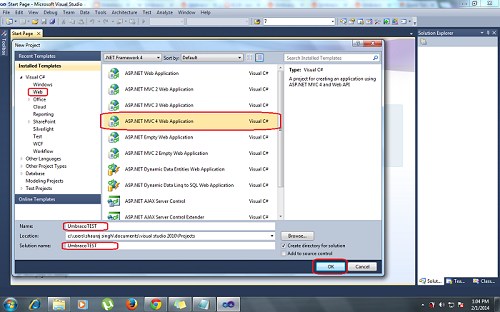
Step 1: Open Visual studio then click on FILE--> then NEW --> then select Project. you will get the dialog box.select WEB then ASP.Net MVC4 Web Application then give the proper name and click on OK. 
 

Step 2: you will get another dialog Box,you need to select Empty Template the view engine as RAZOR then click on OK.


 Step 3: Right side of the visual studio you will get solution explorer. tin that you need to delete few files that is mention below.


Step 4: Then you need to go to Tools then Library Package Manager Then click on Manage NuGet Package for Solutions. 


Step 5: Then you need to search the template online,for that you hae to type   in the search box then Umbraco CMS will appear then select umbraco CMS and click on install.it will take some time to install so u can  take a brk..


Step 6: Once it will be installed then you need to do some changes in UmbracoSetting.config inside config folder.first you need to change the WebForms to MVC inside umbracosetting.config.


Step 7: All  the configuration is done now press F5 to run the application.once it will start you will get below screen.Click on lets get Started.then click on Accept and continue.


Step 8: you need to configure your Database.you need to select the second radio button to configure user defined DataBase, then enter your Sql server name which you used to connect to sql server. then give a proper Database name and check the checkbox for integrated security to true.then click on install.


Step 9: Then you need to create a user account to login the umbraco backoffice.


Step 10:once user profile is created then click on done and then click on set up your new website..